Never Miss a Beat With Mobile Push Notifications for Football Agents

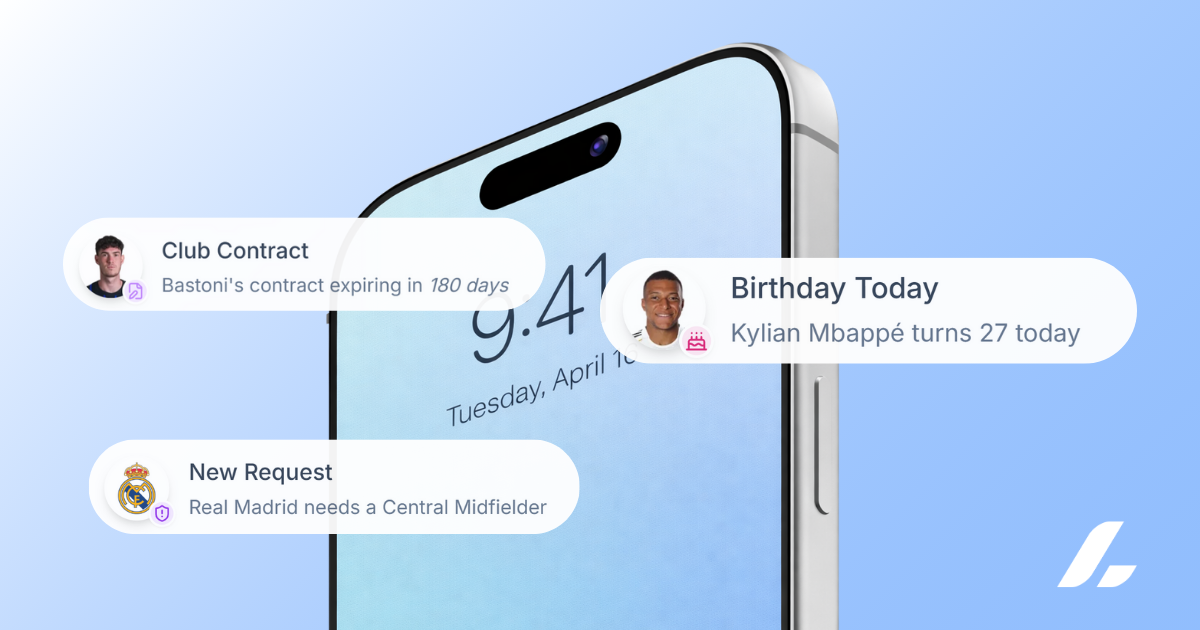
- 01Instant Awareness: Receive alerts for new club requests and player birthdays directly on your lock screen.
- 02Global Connectivity: Stay synchronized with your team across multiple time zones without manually checking your dashboard.
- 03Risk Mitigation: Never miss a contract renewal deadline or a time sensitive task while traveling between matches.
Being a football agent means juggling constant communication, travel, negotiations, and day-to-day overhead that never really stops. That’s exactly why we’re excited to let you know that mobile push notifications are now live, so you can stay on top of key updates in real time such as player birthdays, new club requests, contracts, tasks and more.
Why Push Notifications Matter for Football Agents
As a football agent, your day doesn’t stop when you leave your desk. Important updates can happen at any moment, including:
- Player birthdays
- New club requests
- Contract updates
- Task reminders
- Time-sensitive actions
With mobile push notifications enabled, you’ll never have to manually check your dashboard to stay up to date. Instead, critical alerts come straight to your phone, keeping you one step ahead at all times.
Real-Time Updates, Wherever You Are
Whether you’re in meetings, traveling between countries, or pitch-side on matchday, push notifications ensure you’re always in the loop, without disrupting your workflow.
This feature is designed to:
- Reduce missed deadlines
- Improve response times
- Streamline daily agent operations
- Support better player and club relationships
How to Enable Push Notifications
Getting started only takes a minute. Follow the steps below based on your device.
Enable Push Notifications on iOS (iPhone)
- Open Safari and go to app.athlivo.co
- Tap the three dots in the bottom right
- Select Share, then tap “Add to Home Screen”
- Open ATHLIVO from your home screen
- Go to Settings → Notifications
- Toggle Push Notifications to ON
Enable Push Notifications on Android
- Open Google Chrome and go to app.athlivo.co
- Tap the three dots in the top right
- Select “Add to Home Screen”, then tap Install
- Open ATHLIVO from your home screen
- Go to Settings → Notifications
- Toggle Push Notifications to ON
Stay Ahead in a Competitive Football Industry
Football never slows down, and neither should your access to information. With mobile push notifications enabled, you can focus on what you do best while ATHLIVO keeps you informed in the background.
👉 Turn on push notifications today and stay ahead of every opportunity.